# Lookup Code
This transaction allows a PoS, or any OHIE component, to access terminological information in the terminology service to retrieve detailed information on a code. A typical example would be to retrieve descriptive information on a laboratory code from the LOINC Code System.
Both external systems and systems inside the HIE may perform this transaction directly with the TS. The sequence diagram below shows the steps that occur for a system using this transaction.
1. Lookup: Retrieve information on Code '26453-1' in the LOINC Code System.
| Workflow Maturity | 
Mature
| - One or more OpenHIE implementations of this workflow exist in one or more countries
- Workflow is defined and ARB approved
- Workflow is supported by mature standards
|
| ----------------------------- | -------------------------------------------------------------------------------------------------------------------------------------------------------------------------------------------------------------------------------- | ----------------------------------------------------------------------------------------------------------------------------------------------------------------------------------------------------------------------------------------------------------------------------------------------------------------------------------------------------------------------------------------------------------------------------------------------------------------------------------------------------------------------------------------- |
| Standards\* | | The FHIR CodeSystem lookup operation: . HL7 FHIR Specifications v3.0 or higher support lookup. The response is an object that contains details about the code, including definition, status, designations, and properties.
This workflow implements the IHE IT Infrastructure Technical Framework Supplement - Sharing Valuesets, Codes, and Maps (SVCM) Transaction: Lookup Code ITI-Y4.
|
| Assumptions and Prerequisites | | The required CodeSystems have been preloaded into the Terminology Service and the specified code exists in the Code System. |
| Actors | | - PoS - The point-of-service system or other HIE component that is requesting to lookup a code.
- TS - Stores the curated official version of the terminology and codes for the health system.
|
## Interaction Description
The following is a description of the interaction steps.
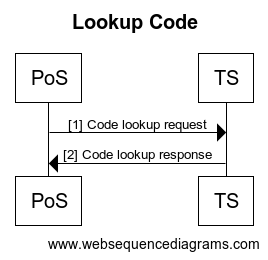
| Ref | Interaction | Data | Transaction Options |
| --- | -------------------- | ---------------------------------------------------------------------------------------------------------------------------------- | ------------------------------------------- |
| 1 | Code Lookup request | The validate-code request is triggered by a PoS or other HIE component.
Input: A Concept Code and target Code System.
| FHIR CodeSystem Resource, $lookup operation |
| 2 | Code Lookup response | The response is sent back to the requesting system.
Output: an object containing code information.
| FHIR CodeSystem Resource, $lookup operation |
---
# Agent Instructions: Querying This Documentation
If you need additional information that is not directly available in this page, you can query the documentation dynamically by asking a question.
Perform an HTTP GET request on the current page URL with the `ask` query parameter:
```
GET https://guides.ohie.org/arch-spec/introduction/terminology-service-workflow/lookup-code.md?ask=
```
The question should be specific, self-contained, and written in natural language.
The response will contain a direct answer to the question and relevant excerpts and sources from the documentation.
Use this mechanism when the answer is not explicitly present in the current page, you need clarification or additional context, or you want to retrieve related documentation sections.