> For the complete documentation index, see [llms.txt](https://guides.ohie.org/arch-spec/llms.txt). Markdown versions of documentation pages are available by appending `.md` to page URLs; this page is available as [Markdown](https://guides.ohie.org/arch-spec/staging/introduction/care-services-discovery/request-care-services-updates-workflow.md).
# Request Care Services Updates Workflow
Workflow for a point of service application to query a Care Services Registry or directory for updates to health workers, facilities, organizations, and/or the services provided by each.
| **Workflow Maturity** | 
Maturing
| - Workflow is defined and ARB Approved
- Workflow is supported by emerging IHE mCSD standard
|
| ----------------------------- | -------------------------------------------------------------------------------------------------------------------------------------------------------------------------------------------------------------------------------- | ------------------------------------------------------------------------------------------------------------------------------------------------------------------------------------------------------------ |
| Standards\* | | Mobile Care Services Discovery (mCSD): ftp\://ftp.ihe.net/DocumentPublication/CurrentPublished/ITInfrastructure/IHE\_ITI\_Suppl\_mCSD.pdf |
| Assumptions and Prerequisites | | A Care Services Registry shall have one or more of the following resources:
- Location
- Practitioner and PractitionerRole
- Organization
- HealthcareService
|
| Actors | | - ILR= InterLinked Registry, mCSD Care Services Update Consumer
- CSR = Any Care Services Registry (e.g. HWR or FR), mCSD Care Services Update Supplier
|
## **Interaction Description**
The following is a description of the interaction steps.
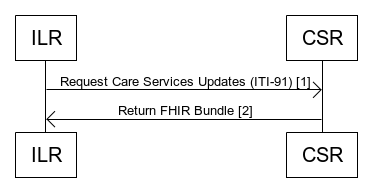
| **#** | **Interaction** | **Data / Notes** | **Transaction Options** |
| ----- | ----------------------------- | ------------------------------------------------------------------------------------------------------- | ---------------------------------------- |
| 1 | Request care services updates | HTTP GET Request with optional date parameter. Can be for any supported resources. | \[ITI-91] Request Care Services Updates |
| 2 | Return updated care services | HTTP response with FHIR Bundle of matching resources or an error if an invalid request or server error. | \[ITI-91] Request Care Services Updates |